



Introduction
This case study examines the integration of SAP Commerce with Magnolia CMS to build a powerful electronic storefront. The objective is to combine Hybris's robust e-commerce functionalities with Magnolia's versatile content management system (CMS) to deliver a seamless shopping experience.
Background
SAP Commerce: A top-tier e-commerce platform that provides extensive tools for managing product content, handling transactions, and offering personalized customer experiences.
Magnolia CMS: A Java-based content management system known for its user-friendly interface, flexibility, and powerful content management capabilities, making it an excellent choice for managing the marketing and content aspects of a website.
Objectives
Flawless Integration: Ensure a seamless merger of SAP Commerce and Magnolia CMS to blend e-commerce capabilities with robust content management.
Enhanced User Experience: Deliver a unified and enhanced user experience by utilizing the unique strengths of both platforms.
Efficient Content Management: Allow marketing teams to manage content independently from the e-commerce functionalities.
Architecture Overview
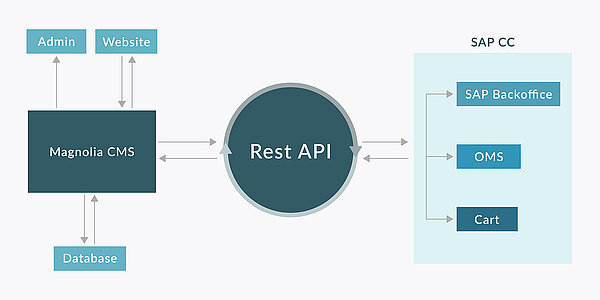
The integration utilizes a hybrid architecture in which SAP Hybris manages the e-commerce backend, while Magnolia CMS oversees the content presentation layer. The two systems are interconnected through APIs, ensuring data consistency and real-time updates.
Steps to Integration
1. Hybris Setup:
- Install and configure the SAP Hybris Commerce Suite.
- Establish the electronic storefront in Hybris, including product catalog, pricing, and inventory management.
2. Magnolia Setup:
- Install Magnolia CMS.
- Configure Magnolia to manage site templates, components, and content.
- Product Data Synchronization: Use Hybris APIs to fetch and sync product data with Magnolia, ensuring that the storefront always displays the most current product information.
- User Authentication and Session Management: Integrate user authentication between Hybris and Magnolia to ensure consistent session management. Use OAuth or similar protocols for secure handling of user sessions.
- Order Management: Orders placed through the Magnolia-managed storefront will be processed by Hybris. Magnolia will transmit order details to Hybris via APIs for processing and fulfillment.
- Template Design: Develop responsive templates in Magnolia CMS that pull and display product data from Hybris..
- Content Components: Build reusable content components in Magnolia, such as banners and promotional sections, that can be easily managed by marketing teams.
- Dynamic Content Rendering: Enable dynamic content rendering in Magnolia to showcase personalized product recommendations, promotions, and content based on user behavior tracked by Hybris.
- Integration Testing: Conduct thorough integration testing to ensure seamless data flow and functionality between Hybris and Magnolia.
- Performance Testing: Evaluate the system’s performance to ensure it can handle high traffic and large data volumes efficiently.
- User Acceptance Testing (UAT): Engage key stakeholders in UAT to confirm the system aligns with business requirements and delivers a smooth user experience.
Integration Features
Product Display
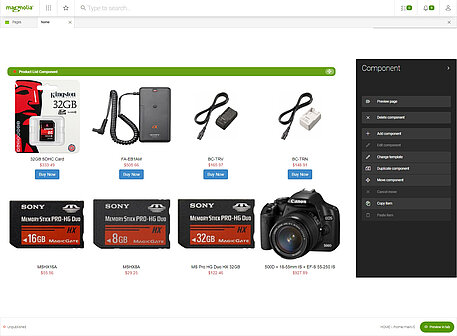
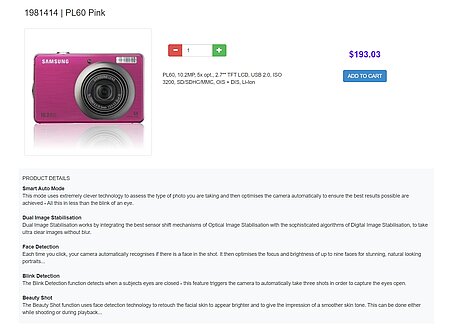
- Magnolia templates are configured to retrieve product details by calling Hybris APIs.
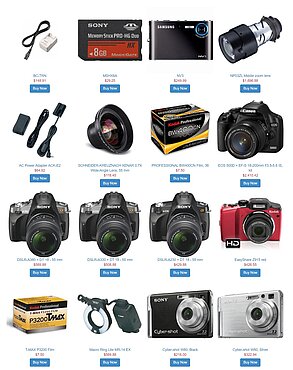
- Product listings and detail pages are dynamically populated with the data received from Hybris.
- Marketing teams can enrich these pages with additional content, such as articles and images, managed directly within Magnolia.


Shopping Cart and Checkout
- Hybris manages the shopping cart functionality, which is seamlessly integrated into Magnolia’s templates.
- Users can add products to their cart, with the data being processed by Hybris.
- The checkout process is handled by Hybris, with Magnolia providing the front-end interface.
Promotions and Personalization
- Marketing teams use Magnolia to create promotional content and campaigns.
- Hybris provides data on user behaviour, enabling Magnolia to display personalized content.
- Perform UAT with key stakeholders to validate that the system meets business requirements and provides a smooth user experience.


Conclusion
Integrating SAP Commerce with Magnolia CMS enables businesses to leverage the strengths of a top-tier e-commerce platform alongside a versatile CMS. This combination provides a superior user experience, efficient content management, and a scalable solution for online storefronts. By implementing the outlined steps, businesses can ensure a successful integration that effectively addresses their e-commerce and content management requirements.